
Short answer: MT4 and MT5 come from the same company (MetaQuotes) and both trade forex and gold, but MT5 is newer and has more tools: 21 timeframes (MT4 has 9), 6 pending order types (MT4 has 4), a built-in economic calendar, and a faster, more detailed Strategy Tester. MT4's advantage is its huge library of existing EAs and indicators. Crucially, MT4 EAs don't run on MT5. Beginners starting from scratch can simply choose MT5; if you use an EA or copy trading, choose the platform that system supports.
"Should I use MT4 or MT5?" is one of the first questions after opening a trading account. Many people pick whatever a friend uses, then find out later that the indicator or EA they want isn't supported. This article compares the differences that matter in real trading and sums up which platform suits each type of trader. (If you're new to MT4, read What is MT4 first.)
A short history
MT4 launched in 2005, designed specifically for forex, and became the global standard for retail trading
MT5 launched in 2010, designed for multiple markets including forex, stocks and futures (depending on what your provider offers)
Both still work, but MetaQuotes develops new features mainly for MT5, and many newer providers offer only MT5.
MT4 vs MT5: all 12 differences
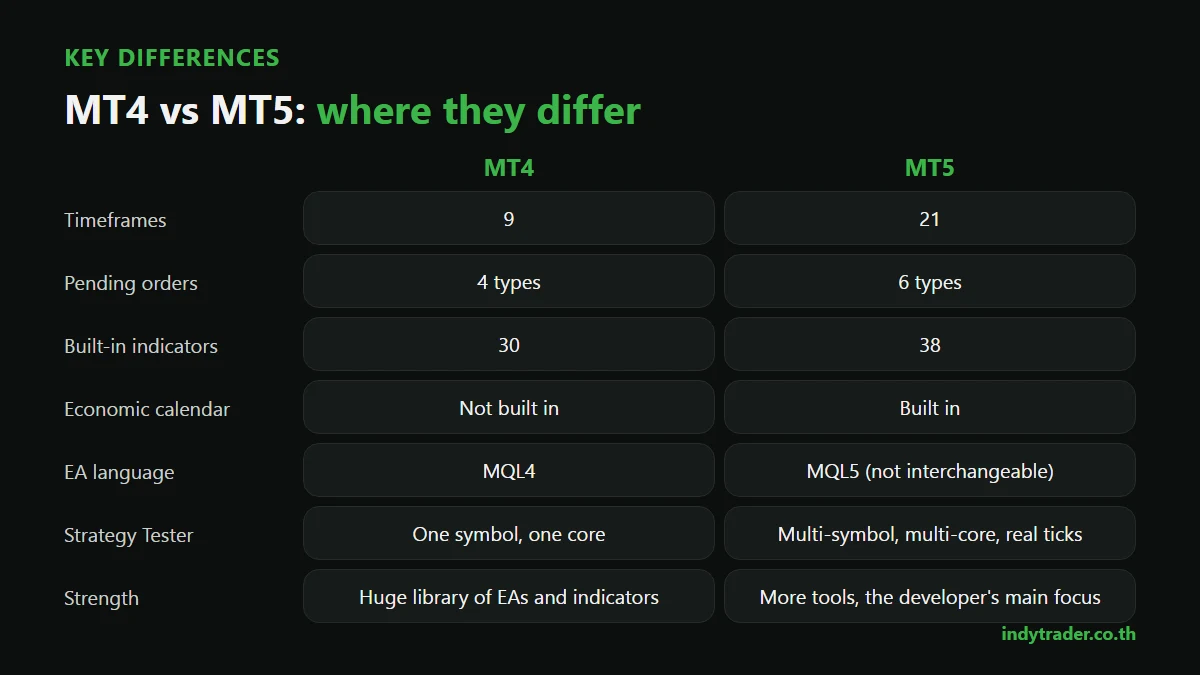
Topic | MT4 | MT5 |
|---|---|---|
1. Timeframes | 9 (M1 to MN) | 21, adding e.g. M2, M3, M10, H2, H3, H6, H8, H12 |
2. Pending orders | 4 types | 6 types, adding Buy Stop Limit and Sell Stop Limit |
3. Built-in indicators | 30 | 38 |
4. Drawing tools (graphical objects) | 31 | 44 |
5. Economic calendar | Not built in | Built in, can show news on charts |
6. Depth of Market | No | Yes (depending on the provider) |
7. Position accounting | Hedging (buy and sell the same symbol at once) | Hedging or netting (one combined position), depending on the account |
8. EA language | MQL4 | MQL5, not interchangeable |
9. Strategy Tester | One symbol, one CPU core | Multiple symbols, multiple cores, real tick data |
10. Available EAs and indicators | The largest library, built up over almost 20 years | Growing, but still smaller in some categories |
11. Speed and performance | Enough for normal trading | Faster, better for heavy calculations |
12. Tradable markets | Forex, gold and CFDs, depending on the provider | The same, plus stocks or futures if the provider offers them |
The differences that matter in real trading
1. EAs and indicators: check this before choosing
EAs and indicators written for MT4 (.ex4 / .mq4 files) don't work on MT5, and vice versa. If you've bought or been given an EA, or rely on a particular indicator, check that a version exists for the platform you'll use (see What is an EA).
2. Strategy Tester: MT5 is far better for testing
If you test trading systems or EAs, MT5's real-tick and multi-symbol testing gets results closer to reality and reduces the risk of an unrealistically good backtest (see What is backtesting).
3. Hedging vs netting
In MT4 you can hold a buy and a sell on gold at the same time as two separate trades (hedging). In MT5, an account can be hedging like MT4, or netting, which combines all trades in one symbol into a single position. Most forex providers open MT5 accounts as hedging, but if your method needs several separate trades, ask your provider before opening an account.
4. A built-in economic calendar
Gold and currencies move sharply around big news such as US jobs figures or central bank meetings. MT5 shows these events in the software and on charts, which helps you avoid opening a trade just before major news without realising. MT4 users need a separate calendar website.
5. Stop Limit orders
MT5 adds Buy Stop Limit and Sell Stop Limit orders, which combine waiting for a break with waiting for a pullback, for example "if gold breaks 4,020, place a buy limit at 4,012". They suit traders who trade breakouts and then wait for price to retest.
How different are they to use?
For basic trading they look and work much the same. Market Watch, Navigator, Terminal and the main shortcuts, such as F9 for a new order, are identical. Anyone fluent in MT4 can switch to MT5 within a few days. The most visible differences are MT5's order window, which puts all 6 pending order types in one place, and the Calendar tab in the Toolbox.
MT4 or MT5: which to use, by type of trader
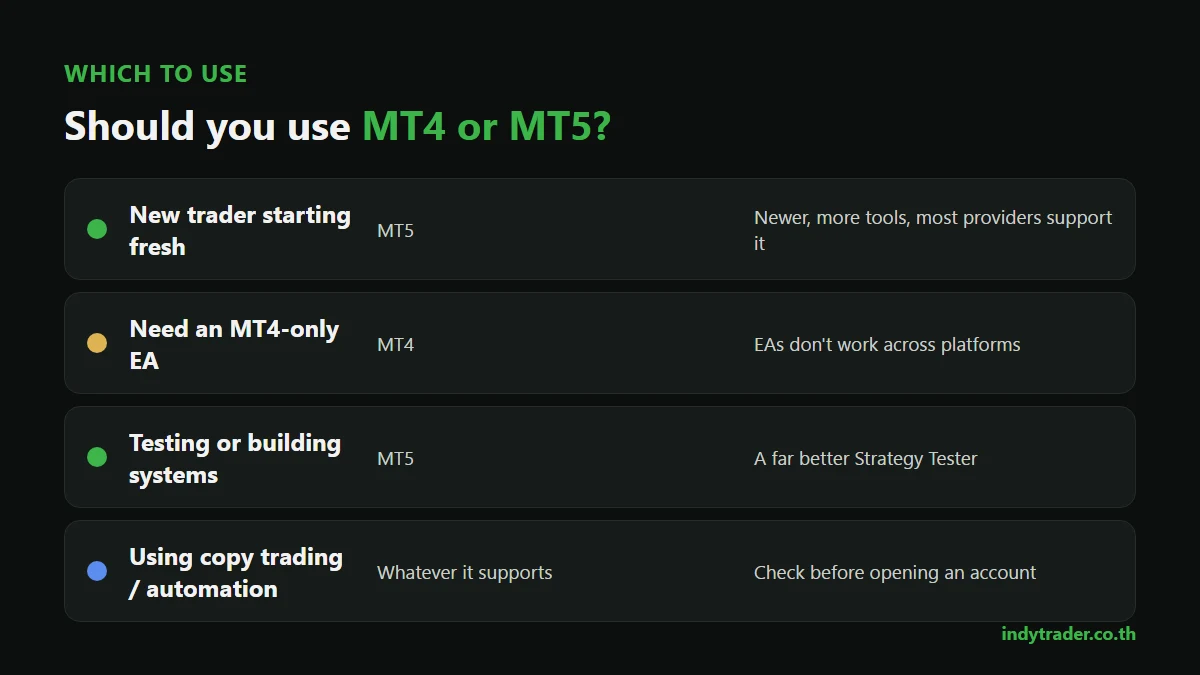
If you are | Choose | Why |
|---|---|---|
A beginner starting out | MT5 | Newer, more tools, supported by most providers |
Using an EA or indicator that only exists for MT4 | MT4 | They don't work across platforms |
Testing or building your own systems | MT5 | A much better Strategy Tester |
Using copy trading or a provider's automation | Whatever it supports | Check before opening an account |
Trading news or short-term across many timeframes | MT5 | More timeframes and a built-in calendar |
Already fluent on MT4 and not using EAs | Stay, or switch gradually | No urgent reason to change |
Indy Trader's copy trading service, AI Auto Trade, supports both MT4 and MT5, so users can choose whichever they prefer (for how copy trading works, see What is copy trading).
Moving from MT4 to MT5
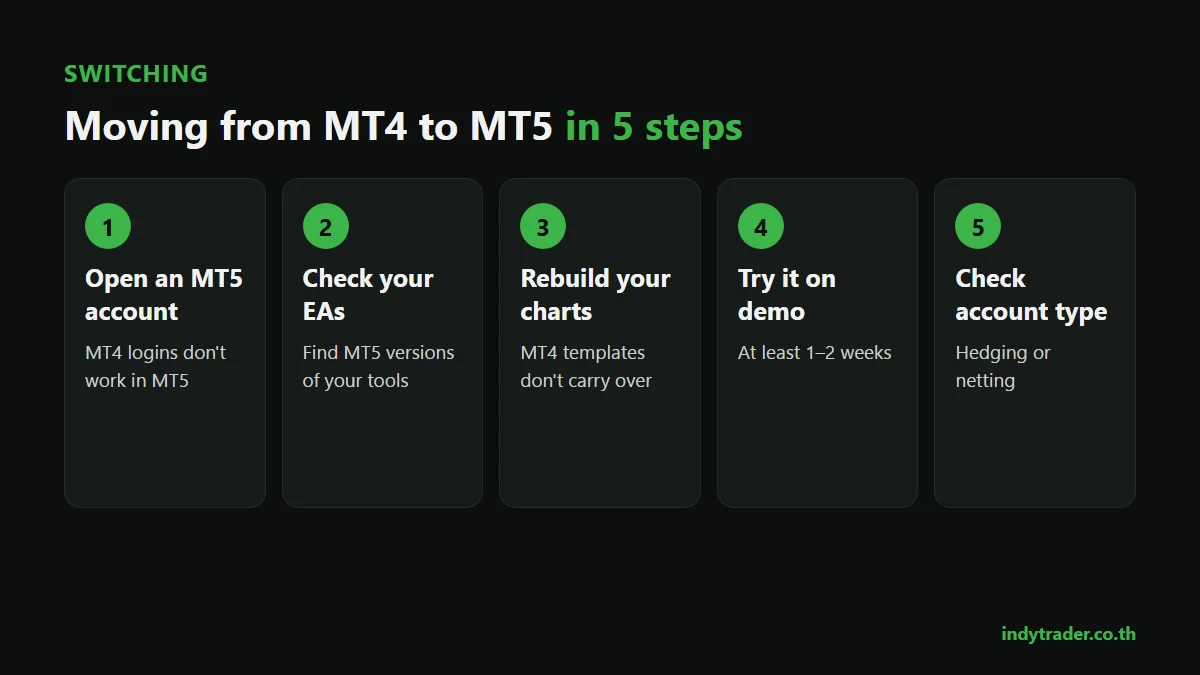
Open a new MT5 account. MT4 accounts can't log in to MT5; ask your provider for a new account
Check your EAs and indicators and find MT5 versions of the tools you use
Rebuild your charts and templates. MT4 templates don't carry over directly
Try it on a demo first, for at least 1–2 weeks, to get used to the order window (see Forex demo accounts)
Check the account type, hedging or netting, so it suits how you trade
Summary
MT4 and MT5 both trade forex and gold. MT5 has more tools and is where the developer's focus lies; MT4 is still strong for its large library of EAs and indicators. Beginners can go straight to MT5, while EA and automation users should choose whatever their system supports. Whichever platform you use, results come down to your plan and risk control (see Risk management). For other apps such as TradingView, read Forex trading apps for beginners.
Learn to use your trading platform properly
The Road to Trader course for beginners, taught by founder Coach Beer, covers forex basics, trading mindset, key terms such as pips, lots, leverage and margin, the MT4 platform and the Indy System Trade method, with access to the Indy Trader community.
Frequently asked questions
What's the difference between MT4 and MT5?
MT5 has more timeframes, pending orders, indicators and drawing tools, a built-in economic calendar and a better Strategy Tester. MT4 has a bigger choice of EAs and indicators, and EAs can't be used across the two platforms.
Should a beginner use MT4 or MT5?
If you're starting from scratch and don't need a particular EA, MT5 is the better choice: newer, more complete and supported by most providers. Basic use is very similar to MT4.
Can I use an MT4 EA on MT5?
No. MT4 EAs are written in MQL4 and MT5 uses MQL5, so you need a version written for that platform.
Can I log in to MT5 with my MT4 account?
No. Accounts are platform-specific, so you need to open a new MT5 account with your provider.
Is MT4 or MT5 better for trading gold?
Both trade gold. MT5 has the edge thanks to its built-in economic calendar, which matters for gold's sharp moves around news, and its wider choice of timeframes.
By the Indy Trader team. Indy Trader is a forex and gold trading academy founded in 2012 by Coach Beer (Tithivat Huayhongtong).
Risk warning: Forex and gold trading carry a high level of risk and you may lose some or all of your capital. This article explains how to use software and is not investment advice.
